Printables · 2 min read · Updated 2026-11-25
How to Print Clean Spot-the-Difference Worksheets for Seniors and Classrooms
Step-by-step printing tips for clean photo worksheets with separate numbered answer keys on standard Letter or A4 paper.
Two-Page Layout Built Into Every Puzzle
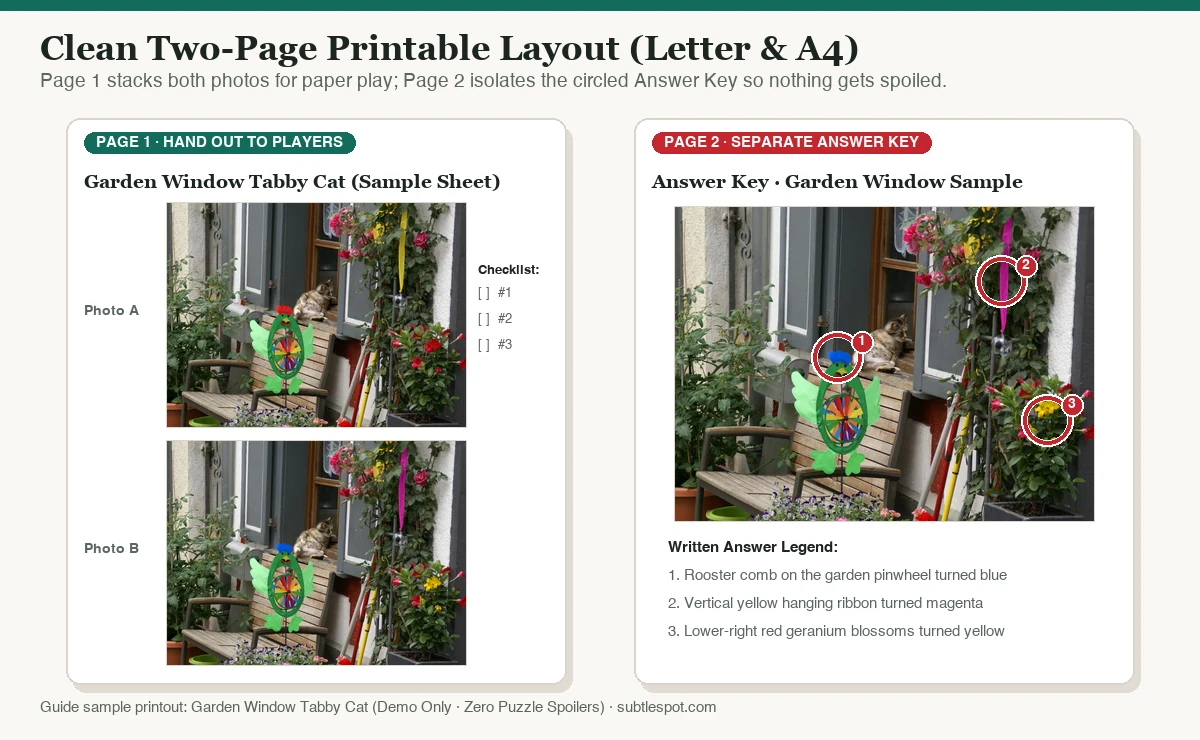
Every puzzle on SubtleSpot includes a one-click Print PDF button right in the top toolbar. Page 1 stacks Photo A and Photo B cleanly on a single sheet with a quiet header and numbered check-off lines at the bottom.
Page 2 automatically places the Answer Key on its own sheet with numbered circles overlaid on the photograph and a plain-text list, so you can hand out Page 1 to family members, students, or senior activity groups without giving anything away.
Best Printer Settings for Clear Photos
To get the cleanest paper worksheets from Chrome, Safari, or Edge, check three quick settings in the print dialog:
- Choose Color printing whenever possible, since many of the differences are color changes.
- Set Margins to Default or Minimum and leave Headers and Footers turned off for a tidy page.
- Select Save as PDF if you want to build a holiday packet to share by email or read on a tablet.
Put It Into Practice
Open Free Printable Worksheets